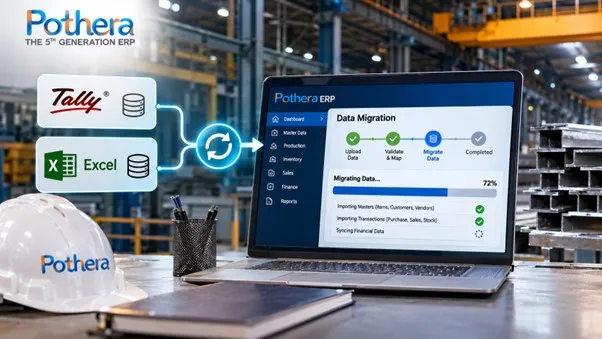
To migrate a steel business from Tally and Excel to an ERP, clean your data first, move master data (items, parties, grades), then opening balances and open orders, run a trial migration, reconcile it against Tally, and go live at a month-end or financial year start. Most mid-size steel businesses complete this in about 8 to 12 weeks, depending on data quality. Pothera ERP, built by Bsquare Solutions, supports Indian steel manufacturers through this move.
Why is data migration the hardest part of a steel ERP implementation?
Because steel data in Tally and Excel is usually spread across files, named inconsistently and tied to people’s memory. The same grade may be written three ways, stock may sit in a register that does not match Tally, and heat numbers may exist only on paper. An ERP is only as good as the data it starts with. If you load messy data, you get messy reports faster.
The good news is that migration is a repeatable process, and most of the work is cleaning and checking, not technology.
What data do you need to migrate?
Move five groups of data, in this order.
|
# |
Data group |
Typical source |
What to check |
|
1 |
Master data: items, grades, sizes, units |
Tally stock items, Excel lists |
Duplicates, spelling, units (kg, tonne, piece) |
|
2 |
Parties: customers, suppliers, dealers |
Tally ledgers |
GSTIN, address, credit terms, duplicates |
|
3 |
Opening balances: ledgers and stock |
Tally trial balance and stock summary |
Must match your closing figures |
|
4 |
Open transactions: open sales orders, purchase orders, unpaid bills |
Tally and Excel |
Only items still pending |
|
5 |
Production and quality data: heat and batch records, BOMs |
Excel and registers |
Often incomplete, so decide what is worth moving |
Do not migrate everything. Closed transactions from past years can stay in a read-only Tally archive.
How do you migrate data from Tally to ERP? (Step by step)
Follow these eight steps.
- Audit your data. List every Tally company, Excel file and register in use. Note who owns each.
- Clean before you move. Merge duplicate items and parties, fix units, and standardise grade and size names. This step saves the most time later.
- Define your master data structure. Decide item codes, grade names, units and categories once, and use them everywhere.
- Export from Tally. Export ledgers, stock items, trial balance, stock summary and outstanding lists to Excel. Keep an untouched copy of every export.
- Map and format. Match each Tally and Excel column to the ERP’s template. This is where most mistakes happen, so assign one owner.
- Run a trial migration. Load a copy of the data into a test ERP environment, not the live one.
- Reconcile. Compare the ERP figures against Tally line by line (see the next section).
- Go live and keep Tally read-only. Cut over at a month-end or the start of the financial year, and archive Tally for reference.
How do you migrate stock from Excel and Tally for a steel business?
Migrate opening stock by item, grade, size, weight and location. If you track heat or batch numbers, load the heat number against each lot. Steel stock is usually kept by weight, and many units hold it in several godowns or yards. Take a physical stock count close to cut-over, and load the counted figure, not the Tally figure, if they differ.
Once loaded, you can manage live stock with Pothera’s inventory management module, so the yard and the books agree from day one.
How do you migrate heat, batch and production data?
Move only the live and recent records you will actually use, such as heat numbers for stock still on hand and open production orders. Old production history in Excel rarely justifies the effort. Instead, start recording heat and batch data properly in the ERP from go-live. Set up open jobs and routings in production and planning management, so planners start with a clean slate.
How do you check that the migrated data is correct?
Reconcile three totals between Tally and the ERP: the trial balance, the stock value and the outstanding balances. If all three match to the rupee, the migration is reliable.
Illustrative example (not actual client data):
|
Check |
Tally |
ERP (trial load) |
Difference |
Likely cause |
|
Closing stock value |
₹4,85,60,000 |
₹4,82,10,000 |
₹3,50,000 |
Three duplicate items with different units |
|
Receivables |
₹2,10,00,000 |
₹2,10,00,000 |
₹0 |
None |
|
Payables |
₹1,35,00,000 |
₹1,34,20,000 |
₹80,000 |
One supplier ledger not imported |
(₹4,85,60,000 − ₹4,82,10,000 = ₹3,50,000; ₹1,35,00,000 − ₹1,34,20,000 = ₹80,000.) Each difference points to a specific fix. Repeat the trial load until all differences are zero. These figures are for explanation only.
When is the best time to switch from Tally to ERP?
The cleanest cut-over points are the start of a financial year (1 April) or the start of a month. Starting at a month-end keeps GST returns and books easy to follow. Avoid switching in the middle of a month, because you would have to split transactions between two systems.
Should you run Tally and the ERP in parallel?
Run both for one month-end close if you can, then retire Tally for daily work. In the parallel month, enter transactions in the ERP and compare the key totals with Tally. Keep Tally as a read-only archive afterwards. Under Indian company law, accounting software must keep an edit log (audit trail) for books of account. Ask your CA to confirm how this applies to the old data and to the new system.
What are the most common migration mistakes?
Seven mistakes cause most problems:
- Loading dirty data without cleaning it first
- Migrating years of closed history that nobody uses
- Using Tally’s stock figure when the physical count differs
- Switching in the middle of a month
- Having no single owner for data mapping
- Skipping the trial migration
- Not training users before go-live
How long does a steel ERP implementation take?
Most mid-size steel businesses take about 8 to 12 weeks, depending on data quality and the number of modules. A typical split looks like this (illustrative, adjust to your project):
|
Phase |
Typical share of time |
|
Planning and data audit |
1 to 2 weeks |
|
Cleaning and mapping |
2 to 3 weeks |
|
Trial migration and reconciliation |
2 to 3 weeks |
|
Training and parallel run |
2 to 3 weeks |
|
Go-live and support |
1 to 2 weeks |
For a budget range, use the Bsquare ERP cost estimator.
What should you ask an ERP vendor about migration?
Ask these six questions before you sign:
- Do you provide import templates for items, parties and opening balances?
- Who does the data mapping, you or us?
- Can you migrate from Tally exports as they are, or do we need to reformat them?
- How many trial migrations are included?
- How is heat and batch data handled?
- What support do we get in the first month after go-live?
Frequently asked questions
1. How do I migrate data from Tally to ERP?
Export ledgers, stock items, trial balance and outstandings from Tally to Excel, clean and map them to the ERP’s template, run a trial load, reconcile the totals and then go live.
2. What data should I migrate from Excel to ERP?
Migrate master data, opening balances, opening stock, open orders and unpaid bills. Leave closed history in an archive.
3. How long does Tally to ERP migration take?
For most mid-size steel businesses, about 8 to 12 weeks for the full implementation, depending on data quality. The migration itself is only part of that time.
4. Can I keep using Tally after moving to ERP?
You can keep Tally as a read-only archive. Use the ERP for daily work.
5. When should a steel business switch from Tally to ERP?
At the start of a financial year or a month, so that books and GST returns stay clean.
6. How do I migrate heat numbers into ERP?
Load heat numbers against the stock lots you still hold, and record new heats in the ERP from go-live.
7. How do I check migrated data is correct?
Reconcile trial balance, stock value and outstanding balances between Tally and the ERP until all differences are zero.
8. How much does steel ERP implementation cost?
It depends on users, modules and deployment. The ERP cost estimator gives a range.
Ready to move from Tally and Excel to a steel ERP?
Share a sample of your Tally export and one stock sheet, and we will show you how it would load into Pothera ERP. Book a free demo with Pothera ERP, or get a quick budget range from the ERP cost estimator.
Learn more about the team behind the product at Bsquare Solutions.